

Skip to content
Ricoh
ClearEdge Security — delivered by Ricoh South Pacific

Network Security

Next-gen firewall, segmentation and zero-trust access — the network layer your business critical traffic actually deserves.

The challenge

Your network is probably one flat segment behind a consumer router.

When the same wire that carries your finance system also carries the guest wi-fi, the printer firmware and an unmanaged camera DVR, a single compromised device puts everything at risk. Pacific offices commonly run business-critical traffic on hardware sized for a home — not because anyone planned it, but because the network grew organically without a refresh.

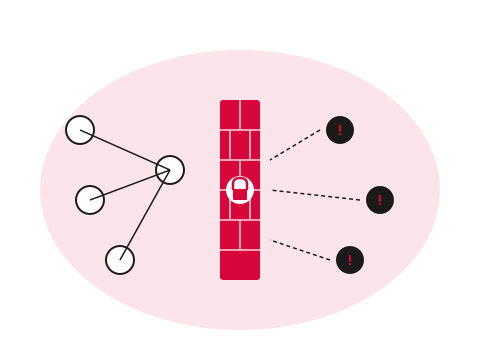
Network nodes separated by a brand-red firewall wall blocking threats
  • What

    What does network security mean?

    Three layers: a next-gen firewall (application-aware, IPS-enabled), network segmentation (separating production, guest, IoT and management traffic), and identity-based remote access. Together they form what enterprises call a perimeter.

  • Why it matters

    Consumer gear was never sized for this

    Most Pacific offices still run business traffic over flat networks behind consumer routers. One compromised IoT device puts your finance system at risk. Cyber insurance and compliance frameworks increasingly require segmentation.

  • How Ricoh fixes it

    We install and manage the layers

    Next-gen firewall, four-to-seven-VLAN segmentation in the first engagement, zero-trust remote access, SD-WAN where there's more than one site. Monitored continuously alongside endpoints.

    See Network Security details
How we help

Our approach.

Most Pacific offices run business-critical traffic over flat networks, unmanaged switches and consumer-grade firewalls. ClearEdge Network Security replaces that with managed, enterprise-class infrastructure: next-gen firewall, network segmentation, secure SD-WAN for multi-site, and zero-trust remote access — designed, deployed and operated.

Capabilities

What's included.

  • Next-gen firewall

    Next-gen firewall

    Application-aware filtering, IPS, malware inspection and SSL inspection — managed by us, monitored by us.

  • Secure SD-WAN

    Secure SD-WAN

    Connect multiple Pacific sites with encrypted, monitored SD-WAN — failover, prioritisation, central policy.

  • Zero-trust access

    Zero-trust access

    Identity-based access to internal apps from anywhere — no full-tunnel VPN required.

  • Network segmentation

    Production, finance, guest, IoT and management traffic on separate VLANs with policy-controlled crossings.

  • Continuous monitoring

    Continuous monitoring

    Egress, anomaly and rogue-device detection — alerted on the same platform that watches your endpoints.

  • Guest and BYOD isolation

    Guest and BYOD isolation

    Visitors and personal devices get internet access only — no path to your business systems.

Proof

Real outcomes from Pacific customers.

1 segment
is one segment too few

ClearEdge Network Security typically introduces four to seven VLANs in the first engagement — separating production, finance, guest, IoT and management traffic. Lateral movement risk drops immediately, and the firewall finally enforces policy that matches how the business actually uses the network.

ClearEdge network security engagements, illustrative.

Free resource

The Network Security buyer's checklist

A short, vendor-neutral guide that walks South Pacific decision-makers through what to ask, what to compare, and how to scope a successful network security project.

  • What to put in the brief — and what to leave out.
  • Red flags in vendor proposals.
  • Realistic budget ranges for Pacific deployments.
Use cases

How customers use this.

  • 01

    Multi-site Pacific business

    Head office plus branches, with consistent policy and central monitoring across every site.

  • 02

    Office refresh or relocation

    Greenfield network design as part of a fit-out — the time to do it properly is during the move.

  • 03

    Post-audit remediation

    Cyber insurance or compliance audits commonly flag flat networks. We remediate quickly and keep evidence.

FAQ

Frequently asked questions.

The questions South Pacific decision-makers ask most often before they engage on network security.

  • What does 'next-generation firewall' actually mean compared to a regular one?

    Traditional firewalls inspect traffic at the port and IP level — they decide whether to let traffic through based on source, destination and port number, but they cannot see what is inside the connection. Next-gen firewalls add application awareness (they recognise that a specific stream of traffic is Microsoft Teams or Dropbox rather than just 'TCP port 443'), intrusion prevention (they detect known attack signatures inside permitted traffic), TLS inspection (they can decrypt and inspect encrypted traffic where policy allows), and threat-intelligence-fed blocklists. The practical difference: a traditional firewall lets anyone with a permitted port through; a next-gen firewall lets the application you actually approved through, and blocks malicious activity inside otherwise legitimate connections.

  • We have a consumer router from our ISP — is it enough for a small office?

    Almost always no for any organisation with more than a handful of staff. Consumer routers are sized for residential traffic patterns, have limited security policy controls, and typically lack the segmentation features needed to separate finance traffic from guest Wi-Fi from IoT devices like printers and cameras. They also have no central monitoring — when one device on the network is compromised, the router has no visibility into the lateral movement. The pragmatic threshold for upgrading is around 10 staff, multi-site operation, regulated industry (finance, government, healthcare), or any environment that holds customer data. Below that threshold, careful configuration of the consumer router plus basic Wi-Fi segmentation is sometimes enough; above it, an enterprise firewall pays back quickly.

  • What is network segmentation and why does it matter?

    Segmentation means splitting the network into separate zones, each with its own policy — typically production (servers, finance systems), staff (laptops and desktops), guest (visitor Wi-Fi), IoT (printers, cameras, building systems), and management (network gear administration). Each zone is allowed to talk to the others only where policy explicitly permits. Without segmentation, a compromised printer or guest laptop can reach the finance server directly; with segmentation, the same attack hits a policy wall and fails. Pacific offices commonly run a single flat network where everything can talk to everything — which is the configuration most current attacks rely on. The first engagement typically introduces four to seven VLANs and the practical risk reduction is immediate.

  • What is the difference between SD-WAN and a traditional VPN?

    Traditional VPN treats every remote site or remote user as the same generic tunnel back to head office — slow, manually configured, fragile when the underlying internet connection changes. SD-WAN is purpose-built for multi-site businesses: it manages multiple internet connections per site (typically a primary fibre link plus a 4G or 5G failover), automatically routes traffic over the best available path per application, encrypts site-to-site traffic end to end, and is managed from a central console rather than configured per device. For organisations with two or more sites, SD-WAN is almost always materially better than a per-site VPN setup. For single-site businesses with no branch offices, traditional VPN for remote workers is usually still the right answer.

  • How does zero-trust remote access work?

    Zero-trust remote access replaces the traditional 'full-tunnel VPN' approach with identity-based access to specific applications. Instead of trusting any device that authenticates with a VPN client and giving it access to the entire network, zero-trust verifies the user identity, the device's compliance state, the location and the time, then grants access only to the specific applications the user needs. The practical experience for users is usually better — applications are reachable directly from their browser or client without a separate VPN client to launch, and the same access works without launching a separate VPN client from the office, home or a customer site. From a security standpoint, a compromised credential cannot pivot laterally because access is application-scoped, not network-scoped.

  • How long does a network security project take?

    A single-site small-business network refresh — firewall replacement, basic segmentation, secure Wi-Fi, remote access — typically deploys in two to three weeks once equipment is in country. Multi-site SD-WAN rollouts run six to twelve weeks for organisations with three to ten sites, planned in batches so each site goes live with the previous one stable. Larger enterprise refresh projects with significant existing infrastructure to migrate from extend to several months. We avoid weekend big-bang cutovers — every project we run keeps a working network in place throughout the migration and cuts over piece by piece.

  • What does ongoing network security management cost?

    Project costs cover hardware, design and installation. A single-site small-business deployment with a managed firewall, switches and Wi-Fi typically lands in the high four-figure or low five-figure range (NZD) for hardware plus a comparable installation fee. Multi-site SD-WAN scales with site count and the SD-WAN platform licensing. Ongoing managed network services are then a per-site or per-user monthly fee covering firewall monitoring, policy management, firmware updates, threat-intelligence subscription, incident response and the central management platform. The recurring fee is what keeps the security posture current as threats and platforms evolve — set-and-forget network gear becomes dangerously out of date within twelve to eighteen months.

Ready to simplify your South Pacific workplace?

Book a no-obligation conversation with a local specialist. We'll listen first and only recommend what actually helps.